How to Download X/Twitter Videos - SnapX User Guide
Wondering how to download videos from X (Twitter)? You're not alone. In this guide, I'll walk you through the simplest way to save X/Twitter videos to any device using SnapX.to, a powerful, free, and secure online downloader.
SnapX.to is a useful tool designed for X/Twitter users to download Videos, Photos, GIFs, and MP3s effortlessly. Supporting high resolutions like Full HD, 4K, and 2K, SnapX helps you save all your favorite content at fast speeds without any software installation.
Engineered for versatility, SnapX features a modern interface with multi-language support and PWA technology. This ensures a seamless experience across all platforms, including PC, iPhone, and Android. Save your favorite X/Twitter content in just a few clicks, whenever and wherever you are.
How to Download X/Twitter Videos with SnapX: 3 Simple Steps
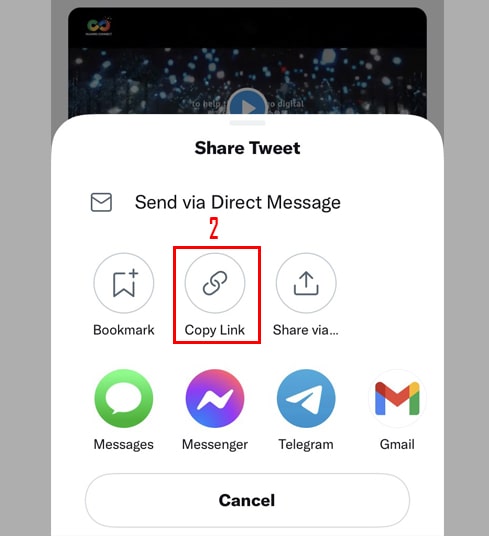
- Step 1: Open the X (Twitter) app, find the video you wish to save, tap the Share button, and choose Copy link.

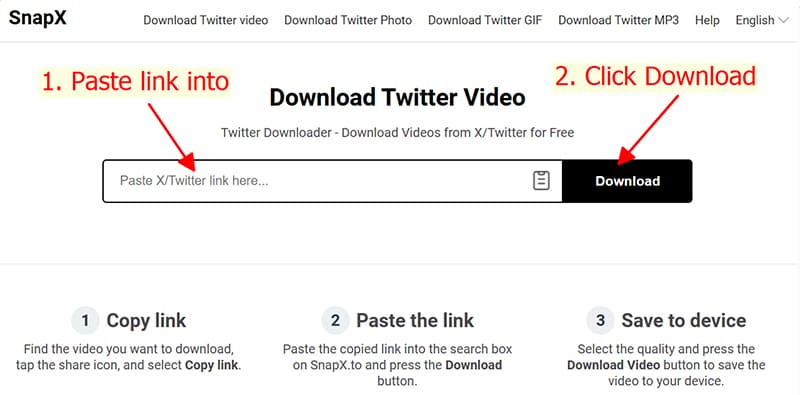
- Step 2: Visit the SnapX.to homepage, paste the URL into the search box, and click the Download button.
- Step 3: Select the Download MP4 or Download MP3 option and wait a moment for the content to be saved to your storage.
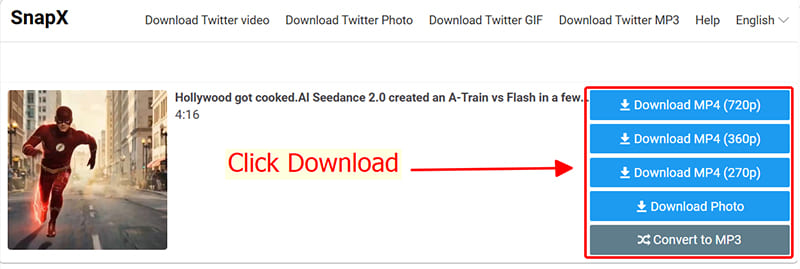
Beyond video downloads, SnapX.to lets you grab photos, GIFs, and convert X/Twitter content to high-quality MP3s. With its clean interface, total compatibility, and free access, SnapX is the ultimate solution for your X needs. Try it today!
Note
- If an error occurs or the video isn't found, it might be due to privacy settings, the content being deleted from X (Twitter), or regional restrictions.
- Experiencing issues with SnapX? Don't hesitate to reach out to our technical team at contact@snapx.to for immediate assistance.